

Hailuo AI’s official international site, hailuoai.video, describes itself as a video and image generator for creators. The page title, checked on 10 November 2026, is “Hailuo AI Video & Image Generator for Creators Online.” The meta description says you can create AI videos and images from text or photos, and that the site offers video, image and meme tools built for creators and social content.
This guide explains how to start with those official labels rather than with a guess about hidden model names or credit prices. The public homepage does not publish a clear static price list in the text that was checked, so this article does not invent a subscription tier or a credit cost. Confirm any plan, credit balance or watermark rule on the live site before you rely on it.
What the official site says it does
The international homepage is built around making clips and stills, not around editing a timeline like traditional desktop software. Two create-page labels appear in the site’s own interface copy: “Text to Video” and “Image to Video.” Those are the two starting points that matter for a first project.
Text to Video is the path you use when you only have a written description. You type what you want to see and the tool generates a clip from that prompt. Image to Video is the path you use when you already have a photo or a still and you want motion added to it. The official description also says you can create images from text or photos, so still-image generation sits next to the video tools rather than replacing them.
Meme tools are listed in the same official description. Treat them as a third, narrower job: short, caption-led social images or clips, not as a substitute for a carefully prompted product video.
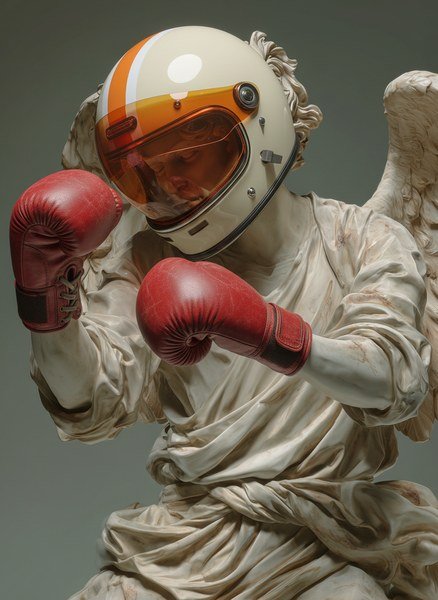
The site publishes sample output. One official still shows a highly stylized figure that looks like a stone statue in a helmet and boxing gloves. Another public cover image shows a formal gown standing in a museum gallery, used as a camera-move example. Those stills are useful as a taste of the look the service puts forward. They are not a promise that your first prompt will match them.
Choose Text to Video or Image to Video first
| Starting point on Hailuo AI | Use it when | What you should prepare |
|---|---|---|
| Text to Video | You do not yet have a still, and you want the tool to invent the scene from a written prompt | A clear description of the subject, setting, lighting and motion you want |
| Image to Video | You already have a photo, artwork or generated still and you want it to move | The source image, plus a short note about the motion you want |
| Image tools | You need a still rather than a clip | The same kind of written brief, or a photo to edit |
| Meme tools | You want a caption-led social graphic or clip | The joke or caption and any source image you plan to use |
If you are trying Hailuo for the first time, pick one row and finish a single test. Switching between Text to Video and Image to Video mid-experiment makes it hard to tell which setting produced the result you liked.
A practical Text to Video brief names the subject, the place, the camera distance and the action in one or two sentences. “A ceramic bowl on a wooden table, slow push-in, morning light” is easier to judge than a paragraph of adjectives. A practical Image to Video brief starts with a strong still and then asks for one motion: a gentle camera move, a turn of the head, steam rising from a cup. The museum-gallery cover on the official site is a reminder that camera movement is part of what the service demonstrates. It is not a reason to request five camera moves at once in a first test.

Judge the first clip before you make twenty more
After you generate a test, watch it once for the subject and once for the motion. Ask three questions the official tools can actually answer:
- Did the subject stay consistent from the first frame to the last?
- Did the motion match the brief, or did the clip invent a different action?
- Is the result close enough to reuse as an Image to Video source if you want a second, more controlled pass?
If the subject drifted, simplify the prompt instead of adding more style words. If the motion was too large, ask for a smaller move. If the composition is right but lifeless, that is the moment to take a favourite still into Image to Video rather than starting over from text.
Keep any on-screen text, logos or real people’s faces out of a first test unless you have the right to use them. The official site is a creative tool; it does not replace your responsibility for the images you upload or the clips you publish.
What to check on the live site before you publish
Because this article does not invent credit prices or plan names, open hailuoai.video and read the current account or pricing panel before you plan a batch of clips. Look for the number of generations included, whether a watermark applies on the free or logged-out view, and how downloads are labelled. If a campaign banner mentions a sale, read the dates and the terms on that banner rather than assuming it applies to every tool.
The same page is also the place to confirm whether you are on the international English site (the /en-US address used here) or a different regional version. Tool names should still match what you see: Text to Video, Image to Video, plus the image and meme tools listed in the official description.
Hailuo AI is easiest to learn when you treat it as a pair of starting points rather than as a mysterious black box. Text to Video invents the scene. Image to Video adds motion to a still you already like. The sample statue and museum stills on the official site show the kind of output the service is willing to put on its homepage. Your own brief, and the live account rules on the day you generate, decide what you can publish.
Official reference pages: Source 1. Checked 10 November 2026. Availability, prices and terms can change; confirm details on the official site before you buy.